Chat Room
The Wizards' Chat Room is open to Wizards' Membership and Wizards' Premium Unlimited members only.
To log in to the Wizards' Chat Room, visit https://chat.handicappingwizards.com.
Use your existing Scratchsoft username and password to log in.
Mobile/Native Versions
In addition to using the web-based chat, you can optionally download and install a native version of the chat app onto your mobile device or desktop. The app is called "Element Messenger" or "Element - Secure Chat & Call" and can be downloaded from one of the links on their page here: https://element.io/download.
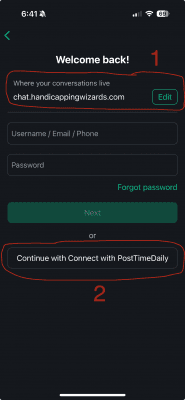
Once downloaded onto your device or computer, you must specify our private chat server. When you first open the app, click the "Edit" button next to "matrix.org" (1). You can then the Homeserver to: chat.handicappingwizards.com .
After changing the Homeserver, you can then click the "Continue with Connect with PostTimeDaily" (2) to log in to the chat room:
Questions?
If you have questions about accessing the Wizards' Chat Room or need assistance, please contact our support team.